

Faster pages convert better. Skipping the academic stuff, here’s how speed (LCP, INP, CLS) turns into revenue and what to do now: leave a render margin, extract critical CSS, defer heavy JavaScript, enable edge caching, and fix your images. A short checklist closes it out.
1. Three metrics that matter
LCP — when the main piece shows up (hero image, headline, price). Good ≤ 2.5s.
INP — how fast the page reacts to clicks and input. Good ≤ 200ms.
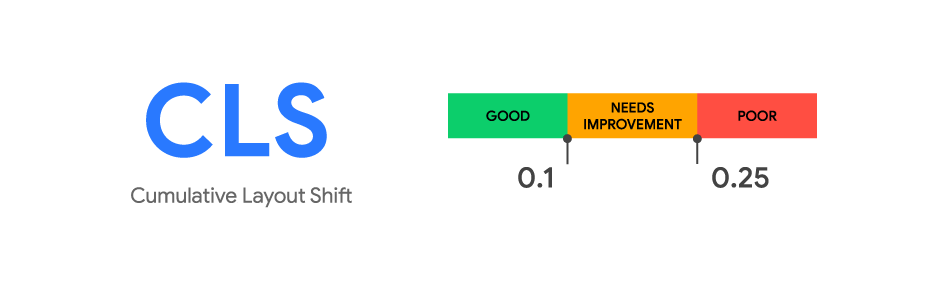
CLS — layout stability (no jumping). Good ≤ 0.1.
The logic is simple: the earlier the core content appears, the more people stay; faster response means fewer abandoned actions; stable layout prevents misclicks and errors.
2. Where time is lost
- Heavy images and missing dimensions — the browser can’t reserve space.
- Late styles — content arrives “unstyled,” then snaps into place.
- Early, bulky JavaScript — much of it can wait until after first paint.
- Fonts and third-party widgets — block rendering.
- Distant servers — each request travels farther than needed.
3. Render margin: show the essence first
Goal: get the page’s core on screen quickly, then fill in the rest smoothly.
- Stream HTML so the browser can start painting early.
- Inline critical CSS for above-the-fold; load the rest as a normal stylesheet.
- Prioritize the LCP image with explicit dimensions and early loading.
- No font flash stalls — allow a fallback font until the main one loads.
- Load third-parties after first paint (analytics/ads once the hero is visible).

4. Critical CSS, done simply
A small ruleset is enough for a clean first screen. Keep it short (~10–14 KB), avoid duplicating global styles, and regenerate when templates change.
5. JavaScript: later and on purpose
Scripts cause much of the delay. Treat interactivity on demand.
- Activate widgets when they enter the viewport or on first user action.
- Split the code: what’s needed now vs later.
- Load scripts in a non-blocking way for the initial render.

6. Edge caching and proximity
A CDN/edge keeps copies near users. A good combo: cache HTML by language/currency/device, serve a fresh-enough version instantly,
and refresh it quietly in the background.
7. Images: the easy win
- Use modern formats (AVIF/WebP) and multiple sizes for different screens.
- Don’t lazy-load the main image; others can wait.
- Always set width/height (or aspect ratio) to prevent jumps (CLS).
- Load galleries progressively, not all at once.
8. Quick start checklist
- Targets: LCP ≤ 2.5s, INP ≤ 200ms, CLS ≤ 0.1.
- First paint: critical CSS in head, key visual prioritized and sized.
- JS: push back what you can; load on visibility/interaction; split bundles.
- Edge/CDN: cache rules for HTML, static assets, and images; long TTLs for versioned files.
- Fonts: allow fallback display; don’t ship unnecessary weights.
- Measure on real traffic (RUM) by template and device, not just in the lab.
9. Conclusion
Speed is about keeping attention and momentum. Show the essentials earlier, respond faster, keep the page steady — and the revenue curves follow.
Tackle it in steps: images, critical CSS, deferred JS, edge cache. Then verify impact on real users.

Is your site slow?
We optimize Core Web Vitals to improve your ranking and conversions.
See our support service →